How many Command strips do you need for each picture?
Check the pair count, weight and frame-size limits on your Command pack. Compare four-pair examples, then work out the strips and packs for your frames.
Use the number of pairs specified for your exact Picture Hanging Strips pack, complete frame weight and outside dimensions. One pair contains two individual strips: one on the frame and one on the wall. The four US product pages below describe four-pair configurations; that does not mean every picture needs four pairs. First check your package’s permitted configuration and placement, then use the purchase calculator to count supplies.
Check your pack and frame · Count strips and packages
Check your pack and frame
- Match the exact product and pack variant. These are interlocking Picture Hanging Strips, not replacement adhesive strips for hooks. Use the product number and the instructions supplied with your pack.
- Weigh the complete picture, including the frame, glazing, mat and contents. Measure the frame’s outside width and height.
- Find the label’s allowed pair count, weight, maximum frame dimensions and placement. Both weight and dimensions must fit the same stated configuration; weight alone is insufficient.
- Check the surface and frame backing against the installation instructions. If every condition fits, note that configuration’s pairs per frame for the calculator. If a limit fails or the configuration is unclear, use another suitable product or hanging method; do not guess a smaller number or add strips to extend a limit.
Do I need two pairs or four?
Read the configuration on your own pack; do not halve a four-pair weight rating to approve two pairs. A two-pair configuration is usable only when your exact instructions explicitly allow it for your frame’s weight, dimensions, surface and placement. If your label shows only four pairs for the applicable setup, use that instruction rather than inventing a lower count.
If the label is missing or unreadable, confirm the configuration with Command before hanging. The table below does not supply a two-pair load limit, and the calculator does not approve the number you enter.
Four-pair limits on selected US product pages
These are limits for four matching pairs, not ratings for a single strip. The product number helps you match the exact listing. Check the package because variants and package counts can differ.
| 3M listing | Pairs per frame | Listed weight limit | Maximum outside frame size | Individual strips |
|---|---|---|---|---|
| Small White, 17202 | 4 | 5 lb in page text; see note | 18 × 24 in | 8 |
| Medium White, 17204 | 4 | 10 lb | 18 × 24 in | 8 |
| Large White, 17206 | 4 | 15 lb | 24 × 36 in | 8 |
| X-Large White, 17217 | 4 | 20 lb | 24 × 36 in | 8 |
Small listing discrepancy: 3M’s Small page text states 5 lb, while an accompanying graphic is labelled 4 lb. Do not use the higher figure to override your package. Confirm the limit and frame size printed on the exact pack you will use.
Check both weight and size: three decisions
Example 1: A complete 8 lb frame measuring 16 × 20 in fits the listed weight and size limits for four Medium 17204 pairs. That is eight individual strips. This is a comparison with 3M’s listing, not a test of your wall, frame backing or installation.
Example 2: A 12 lb frame measuring 20 × 30 in exceeds the Medium size and weight limits. The listed four Large 17206 pairs cover both figures. A frame larger than 24 × 36 in or heavier than 20 lb does not fit any four-pair listing in this table; do not assume extra strips extend those limits.
Example 3 — weight fits, size fails: An 8 lb frame measuring 20 × 30 in is below Medium’s 10 lb weight limit, but exceeds its 18 × 24 in maximum frame size. It does not fit that Medium configuration. The listed four-pair Large configuration covers those numbers; its other installation conditions still need to fit.
See what four pairs means
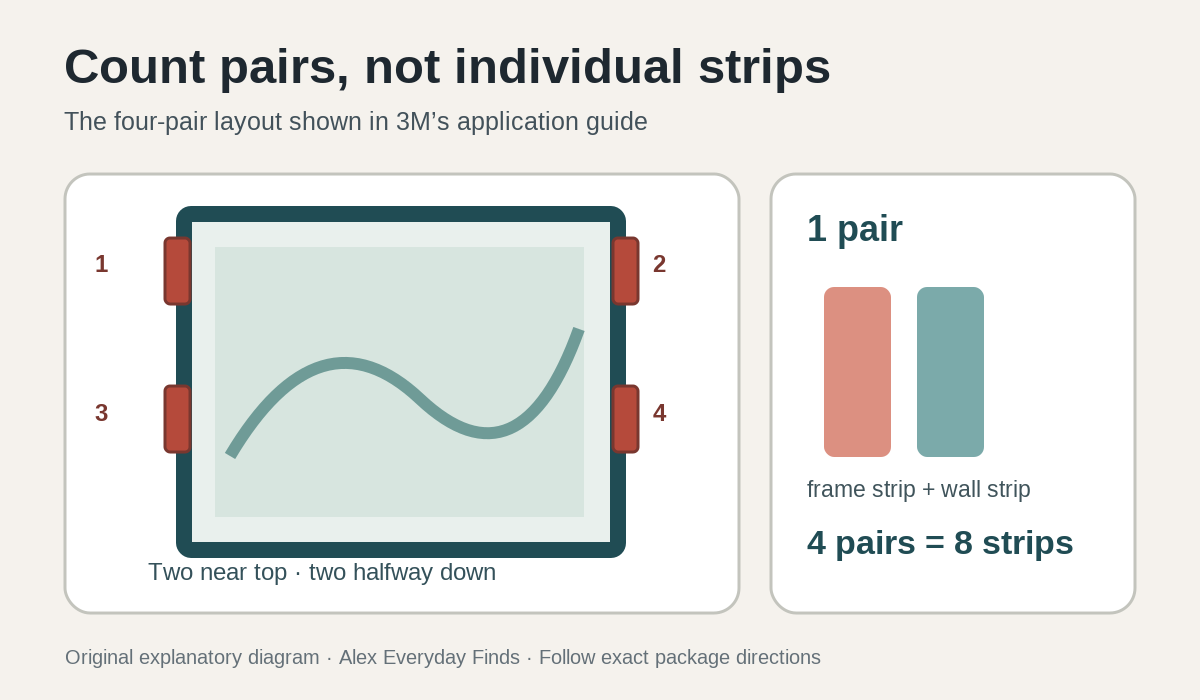
3M’s application guide shows two pairs near the upper corners and two halfway down the sides for the illustrated four-pair setup. Click each pair together before placement. The diagram explains the count; it is not a substitute for the instructions supplied with your product.
Count strips and packages
Use this only after checking the configuration on your package. Enter one group of frames that uses the same strip product and pair count. Count Medium and Large groups separately: their remaining pairs are not interchangeable supplies.
How many packages for several frames?
This counts supplies for the pair count you enter. It does not select or approve a hanging configuration. First check the weight, frame size and placement on your exact package.
For example, three eligible frames using four pairs each need 12 pairs = 24 individual strips. A four-pair package means three packages, with no pairs left. An eight-pair package means two packages, with four pairs left. Read the actual pair count on the package; “strips” may count individual pieces instead. In a mixed-size pack, count only the pairs of the product needed for this group.
The manual calculation is: frames × label pairs per frame = pairs needed; multiply by two for individual strips. Divide pairs needed by matching pairs per package and round up. Subtract pairs used from pairs bought to find the remainder.
Check the surface and installation before hanging
3M’s application guide says to wait seven days after painting, remove existing hanging hardware from the frame’s back, and avoid paper or soft frame backing, wallpaper, beds and valuable or irreplaceable items. It specifies indoor use at 50–105°F. Clean with rubbing alcohol, join and position the pairs, then press the frame to the wall. Remove the frame temporarily, reinforce each wall strip for 30 seconds, and wait one hour before rehanging. Follow the full visual application sequence and your pack.
For removal, the guide shows peeling the frame from the bottom corners, then stretching each adhesive tab slowly down along the wall. Leave room below the frame for this motion. Use the removal distance and sequence on your exact instructions; do not pull the adhesive away from the wall.
Different numbers on your package?
Product variants, markets and packs can have different instructions and quantities. Do not combine the largest weight from one listing with the frame size or pair count from another. Match all limits and placement to your exact pack. If its label and an online listing conflict, confirm the applicable instructions with Command before use.
Do not treat the listed limit as a guarantee against a fall or wall damage. Surface texture, paint, frame material, placement and installation affect the result. If you cannot confirm the complete weight, outside size, suitable surface and exact product instructions, choose a different hanging method or get advice for that wall.
If you are still choosing a frame, our photo mat opening guide explains how artwork, mat and frame dimensions differ. Here, measure the outer frame that will hang on the wall.
If your wall, frame or installation cannot meet the strip instructions, compare picture-mounting alternatives by wall and frame. Do not try to solve an unsuitable surface by adding more strips.
Sources & what to check
Source details checked 2026-11-04. Availability and prices can change; use the links below for current information.
This guide helps you check the configuration on your exact package and count supplies. It does not calculate a safe minimum from weight alone or replace the package instructions. The Small page has conflicting weight text and graphic wording; confirm your label before choosing it. Pack quantities vary.